
Mobile Banking App
Download Our App
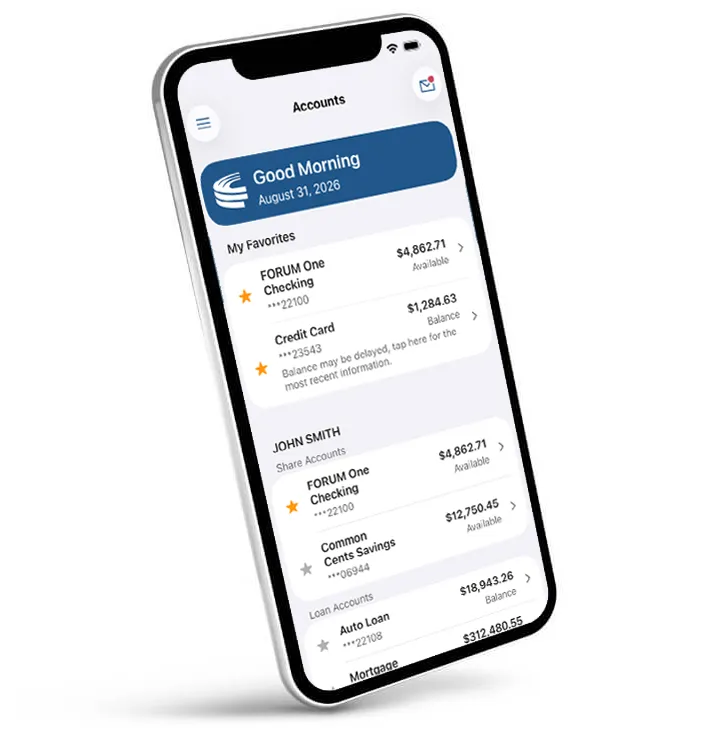
Once you have signed up for online banking, be sure to download FORUM's free mobile app for on-the-go secure access to your accounts. View your credit and debit card transactions, deposit checks, chat securely with FORUM and receive push notifications about account activity.
PLEASE NOTE: Be sure to keep your FORUM mobile app updated to the newest version available. Most phones can be set to update apps automatically when available so no action is needed as updates are made. If your FORUM app is not updated to the newest version you may receive an error message (network unreachable) when trying to use the app.
Download Now


Features
- Alerts – receive real-time account alerts via email or text
- Deposit Checks – use your phone to take a picture of a check & deposit it
- Check Balances – always know how much money you have in your account
- Make payments to your FORUM auto loan, credit card, mortgage & more
- Pay Bills – use free bill pay to pay recurring or one-time bills
- Transfer Money – transfer money between accounts
- Secure chat or email – connect with FORUM for account questions
Mobile Banking Security Tips
FORUM’s mobile banking utilizes the same security standards as our online banking platform. To ensure your personal information is safe and secure while using mobile applications, please read the following safety tips.
- Keep devices password protected in case they are lost or stolen.
- Only download apps from trusted and reputable sources.
- Don’t download new apps without verifying with the institution that it is legitimate.
- Don’t use programs that store and prefill login information.
Yes. It encompasses the same security standards as CU Online and mobile web CU Online. No personal data is stored on the phone. If a member’s phone is lost, their personal and FORUM account data is NOT accessible.
The application will officially be titled: FORUM Credit Union - CU Online within the Google Play Store. The Apple iOS application is titled: FORUM Credit Union in the Apple Store. The developer will be displayed as "FORUM Solutions."
- Access the Google Play Store or Apple Store from your smartphone or tablet.
- Conduct a search for "FORUM Credit Union."
- Android: Click the “Install Free" button and Accept Permissions "OK" button.
- iOS: Click the “Free” button followed by the “Install button,” enter your iTunes password, click “OK.”
You can uninstall the same as any other application.
Android: Choose Settings, Applications, Manage Applications, FORUM CU Online then click Uninstall
iOS: Touch and hold the FORUM CU icon until it appears to wobble. Click the small black X that appears in the upper left corner. When prompted, click Delete. Press the Home button to return the remaining icons to their normal state.
For qualified members, FORUM offers mobile deposits, a service that allows you to make check deposits to your FORUM account from the convenience of your mobile device. Using the camera from a supported device (see below), you can send secure digital images of checks for deposit into your account from anywhere. If you do not have the ability to make deposits from your mobile device, this service can also be used from your desktop computer. See our quick-start guide for using desktop mobile deposit.
See official rules for qualified members who have not used mobile deposit and have received a promotional offer postcard.
Mobile Deposit Instructions
Apple iOS Devices
Mobile deposits are available within FORUM’s CU Online Mobile Banking application. Download or update the FORUM Credit Union app within the Apple Store.
Android Devices
Download or update the FORUM Credit Union app within the Google Play App Store.
Hardware And Software Requirements
Mobile Deposit Requirements
Mobile deposit works with a variety of supported smartphones and devices. It uses a phone’s built-in camera to take photos of the signed check to be deposited. The list of supported devices includes:
- Apple smart devices with iOS version 9.0 or later
- Android smart devices with 4.4 operating system or later
NOTE: Devices must have a 2.0 megapixel (or greater) camera
General Eligibility And Requirements
Credit Score Requirements
- Must have a credit score greater than 600 on file with FORUM (within last 12 months).
- If no current credit score is available and there is no derogatory credit, account holder must have an account relationship of $1,000 or more in deposits (checking, savings, subshares combined) and a membership opened at least 30 days prior.
- If credit score is below 600, account is not eligible for the service regardless of account relationship balance.
- If a primary member is joint on an account, has no derogatory credit, and has a credit score equal to or greater than 700, the account will be automatically enrolled in the Mobile Deposit program.
- Loans must be current. Account holders cannot be more than 10 days delinquent on a loan.
- Shares must be in good standing. No suffix may be negative 30-plus days or have permanent holds or other restrictions placed upon it.
- We must have a valid address on file.
We are open to making exceptions based on individual members and their relationship with FORUM. Please call 317-558-6299 or 800-382-5414 to speak with a Member Service Representative for more information.